
This online, all-platforms Vision Test Battery assesses acuity and contrast sensitivity. Not certified for medical use; Diagnosys LLC will provide certified versions. →New paper on FrACT’s bootstrapped CI95.
For routine testing best use the web app based on a “frozen” version.
FrACT online: embedded↓ or →alone
Try out above↑. Tablets & laptops are fine, smartphones too small, even if rotated.
Frozen❓ versions: 2021-06 2022-03 2023-11 2024-04 2025-08 2025-12 2026-03 2026-09
What’s new?
| 2026-10-11 | 3.5.3 | Default change: showCI95 defaults to ‘on’ (→paper), current presets stay unchanged |
| 2026-07-18 | 3.5.2 | Add settings Hide results and Export HPO code |
| 2026-06-08 | 3.5.1 | GUI: add “𝛼 when disabled”; “Pair remote” → “… phone”; alpha-sort Presets popup |
| 2026-05-14 | GUI: show calibration status info in the GUI and in the response box | |
| 2026-04-03 | Add Letter Score as output format | |
| 2026-03-22 | 3.5 | Bugfix: Vernier linewidth formula. No visible change under default conditions. Thanks to SS for pull request. |
| 2026-02-21 | 3.4 | New: any smartphone can be used as “Phone Response Box” |
| 2026-01-16 | GUI: allow enabling/disabling specific tests, add Auto Preset, improve ½CI95 | |
| 2026-01-01 | 3.3 | GUI: improve perplexing nTrials depending on # of choices controls |
| 2025-12-06 | → “ideal observer” model (simulator) | |
| 2025-10-08 | 3.2 | New feature: all Settings export/import via JSON-textfiles. Build your own Presets! |
| 2025-06-15 | 3.1.2 | New feature: “Line(s) of optotypes” sports a popup to change # of lines directly |
| 2025-06-06 | 3.1.1 | New feature: plotting the results history after the run |
| 2025-05-13 | 3.0 | New export format (6). New feature: ID string and eye condition. Fix bug for incorrect reaction times since mid-March (1000ms too short). Rename many settings to be more systematic without change in their function (3.1) |
| 2025-05-12 | 2.1 | New feature: save results into PDF, for ‘21 CRF Part 11’ compliance |
| 2025-03-12 | 2.0 | Add BaLM10, clear type-ahead buffer during ISI. |
| 2025-01-28 | 1.6 | Gratings now sinusoidal, square-wave, triangular & “checkerboard”; all windows/panes centered in normal & fullscreen view. |
| 2024-10-11 | 1.5 | Vernier “full” export: appropriate format (arcsec not LogMAR); extend postMessages syntax |
| 2024-09-16 | 1.4 | Add optional “ISI” (interstimulus interval); left/right randomization of eccentXInDeg (request); helper fields “best/worst possible acuity”; round out full control of FrACT from supervising software; redesign “Line(s) of optotype” mode; drop superfluous Cappuccino files; add more presets. |
| 2024-06-02 | 1.3 | Control via HTML window.postMessage() for Version, setSettings & Acuity/Contrast test runs. An example: This allows to start the automatic demo run. API described here. |
| 2024-05-19 | 1.2 | Feedback sounds selectable; many internal changes improving documentation, integration, simplification, and extensibility; new Cappuccino framework (1.3.1) |
| 2024-03-28 | 1.1 | Dithering for optotype contrast testing |
| 2024-03-09 | → detailed re-analysis of FrACT’s test-retest variability | |
| 2024-02-14 | 1.0.6 | Improve crowding, line-by-line, etc.; freeze for BCM |
| 2023-08-31 | 1.0.5 | Improve gratings (color, mask, export etc.); add min. stroke-width setting; line-by-line: crowding + headcount, update presets |
| 2023-07-30 | 1.0.4 | Gratings: possible to sweep contrast (to find threshold), or spatial frequency |
| 2023-07-01 | 1.0.3 | Add “embed in noise” (Settings▸Misc) – for research |
| 2023-06-26 | 1.0.2 | Add color for acuity optotypes (Settings▸Acuity) – for research |
| 2023-05-05 | 1.0.1 | FrACT₁₀ as Progressive Web App – now easy to install for offline use |
| 2023-04-30 | Contrast Gratings with error diffusion | |
| 2023-02-07 | Add Autorun – good for demos & testing | |
| 2022-05-24 | Add PRESETS – perfect for specific routine settings | |
| 2022-01-27 | 1.0 | “Line-by-line” mode – user request for optometric clinic |
| 2021-04-26 | Add measure of dispersion for acuity: ½CI95 | |
| 2020-06-08 | Add low contrast acuity; optotype contrast in Weber (not Michelson) units | |
| 2020-05-23 | 0.9 | Add Auckland Optotypes (TAO), Vernier acuity & Tooltips |
What is FrACT / FrACT₁₀?
“FrACT” is a semi-automatic visual test battery, available as a free app. It employs psychometric methods combined with anti-aliasing and dithering to provide self-paced assessment of visual acuities (Bach 1996), contrast sensitivity (using optotypes or gratings), and Vernier acuity on standard equipment. FrACT complies with the international norm for acuity testing (EN ISO 8596) and is recognized as one of the “Recommended Methodolog(ies) for Assessment of Visual Acuity” by the Harmonization of Outcomes and Vision Endpoints in Vision Restoration Trials Taskforce. FrACT is used worldwide in vision labs, by optometrists, ophthalmologists, in clinical trials and by NASA (→Who used FrACT). It has been validated in independent laboratories (→Descriptions & Validations).
A rewrite of the code to serve all platforms resulted in “FrACT₁₀”, the former one being denoted as “classic” FrACT. They are identical in test behaviour. FrACT₁₀’s additional possibilities surpass the classic FrACT; its code is →open source (→commit history). With FrACT₁₀ moving forward online and as a progressive web app, classic FrACT will remain available here.
Key characteristics
- Test symbols / Optotypes: Sloan letters, Landolt rings, tumbling Es, symbols, gratings; Vernier patterns for hyperacuity. Gratings: sinusoidal or square-wave.
- Acuity / contrast thresholds: Assessed with a progression of test symbols, using a Bayesian approach and following a modified “Best PEST” strategy (see General Pertinent Sources for details, psychometric function →here).
- Results Display
- As LogMAR, Snellen fraction, decimal acuity or Letter Score.
- Full details can be exported for further processing or to PDF for archiving.
- Optionally, a 95% confidence interval for the obtained acuity is displayed.
- Customization: Numerous parameters can be configured, including those for testing low contrast acuity and color perception. The results include not just acuity/contrast thresholds but also reaction time and more.
- Technicalities: Equipment resolution limits in space and luminance are mitigated by dithering and antialiasing.
Where and why to use?
- Participants’ screening in research settings: This is where I have personally used FrACT the most.
- Clinical Studies: Ideal for studies where visual acuity or contrast sensitivity is an outcome variable, aided by FrACT’s
PRESETSfor reproducibility, Export options for reporting, and PDF for documenting. It can even be embedded in larger systems and fully controlled via HTML messages. - Acuity detail studies: Useful for research on specific acuity properties including contrast, exposure time, reaction time, feedback, noise, and hyperacuity, as evidenced by numerous papers.
- Perfect for keeping your waiting patients entertained :) !
Many shades of FrACT
- One particular advantage of FrACT: its ultra-wide range with continuous coverage
- For normal vision: FrACT can assess acuities beyond 2.0decimal = 40/20Snellen = –0.3 LogMAR. [Although 20/20 vision is commonly considered as “normal,” numerous studies (e.g., Frisén & Frisén (1981), Elliot et al. 1995, Pointer 2006) suggest that the average acuity among the general population is markedly higher. Consider: If Snellen had adopted the population average as the standard for “normal” vision, approximately half of the population would have fallen below this threshold.]
- For low vision: FrACT can reproducibly assess Counting Fingers (CF) and even Hand Movement (HM): CF≈1.9 LogMAR; HM≈2.3 LogMAR. →Sources and more details.
- For ultra low vision: FrACT has integrated “BaLM” (Basic Assessment of Light, Location and Motion). This allows quantitative assessment starting with LP (light perception).
- This wide range needs appropriate visual display units, see “A note on display resolution…” in the Manual. Nowadays, briefly: with a 4K display you can cover the full range without change in distance.
- Low contrast acuity: e.g., 10% optotype contrast in
Settings▸Acuity▸Optotype contrast/…⏵b/w - Color for Acuity:
Settings▸Acuity▸Optotypes/backgroundcolor▸Color - Mirror support:
Settings▸General▸Displaytransformation - Gratings: Can sweep (find threshold) for contrast or spatial frequency:
Settings▸Gratings▸Whattosweep - Eccentricity for Acuity and Contrast:
Settings▸General▸Optotypeeccentricity[°] - Timing: Control ISI, display time, and max. response time:
Settings▸General▸Timeouts - Noise embedding for Acuity and Contrast:
Settings▸Misc▸Noiseembedding - FrACT in a dark environment? Use
Settings▸Misc▸Windowcolorto select, e.g., dark grey. - For studies: reproducible across time and locations through the
Settings▸PRESETSmechanism or theAllsettingsexport/import, and multiple result export options - Explore the
Settingsfor more. Something unclear? Hover your mouse over any questionable GUI element to reveal tooltips which tell you more. - Full programmatic control of FrACT with HTML messages for embedded installations.
- You can use FrACT with an “ideal observer” model, →example
What does it cost? Free? Where can I get it?
Cost, in one word: Nothing.
Yes, free as in beer. What’s more, my apps don’t contain any code to monetize their use (e.g. selling your location). However, should you desire to contribute: donations are gladly accepted via Buy Me a Coffee.
Please remember to cite it when publishing (with version number). Since this is free software, there’s no warranty for anything. Your feedback is warmly welcomed and has frequently improved FrACT.
My apps do not “phone home” nor contain any code to monetize their use (e.g., sell your location).
While this version of FrACT is free, it is not certified. For regulated environments, Diagnosys LLC will provide certified versions with optional on-site support.
So where can I get it?
Use online (e.g., running embedded above at the top of this page or alone) or as a PWA=Progressive Web App (PWA preferred for regular use).
Install FrACT₁₀ as a Progressive Web App
→ runs offline on all platforms
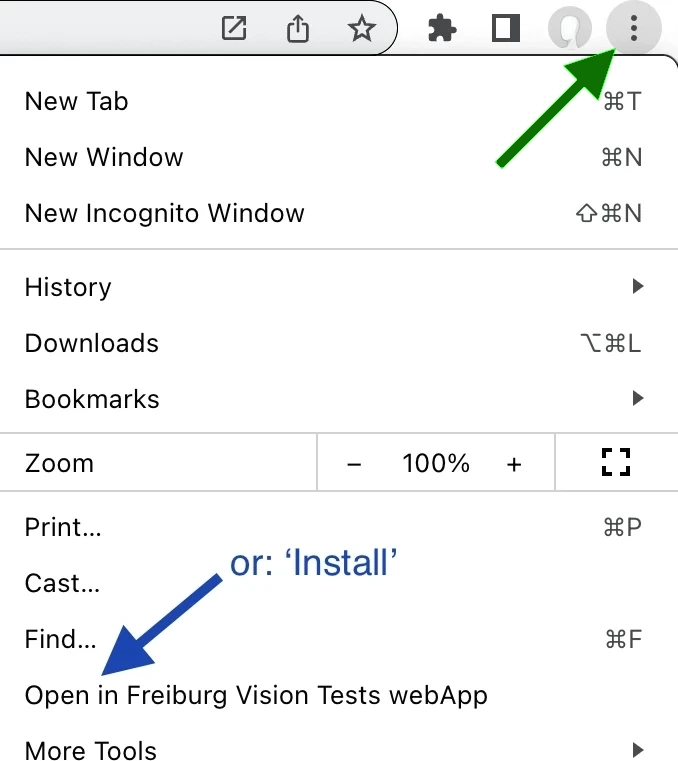
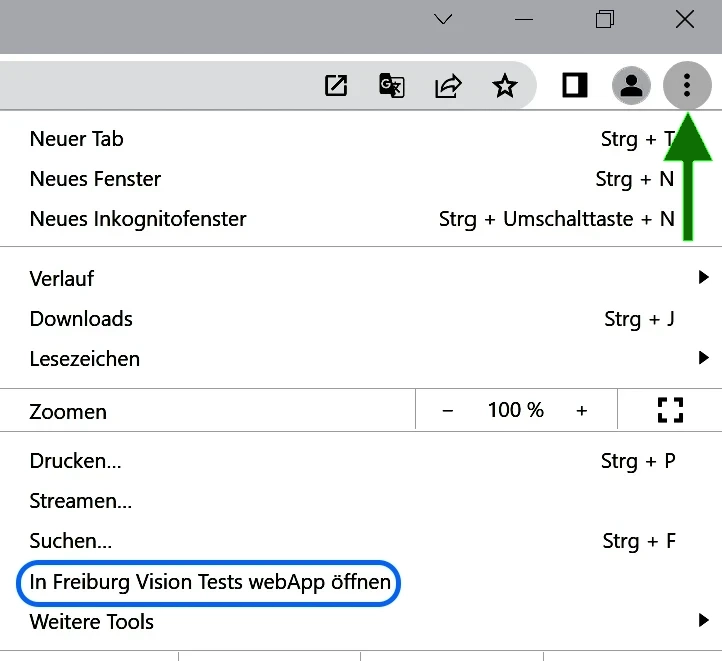
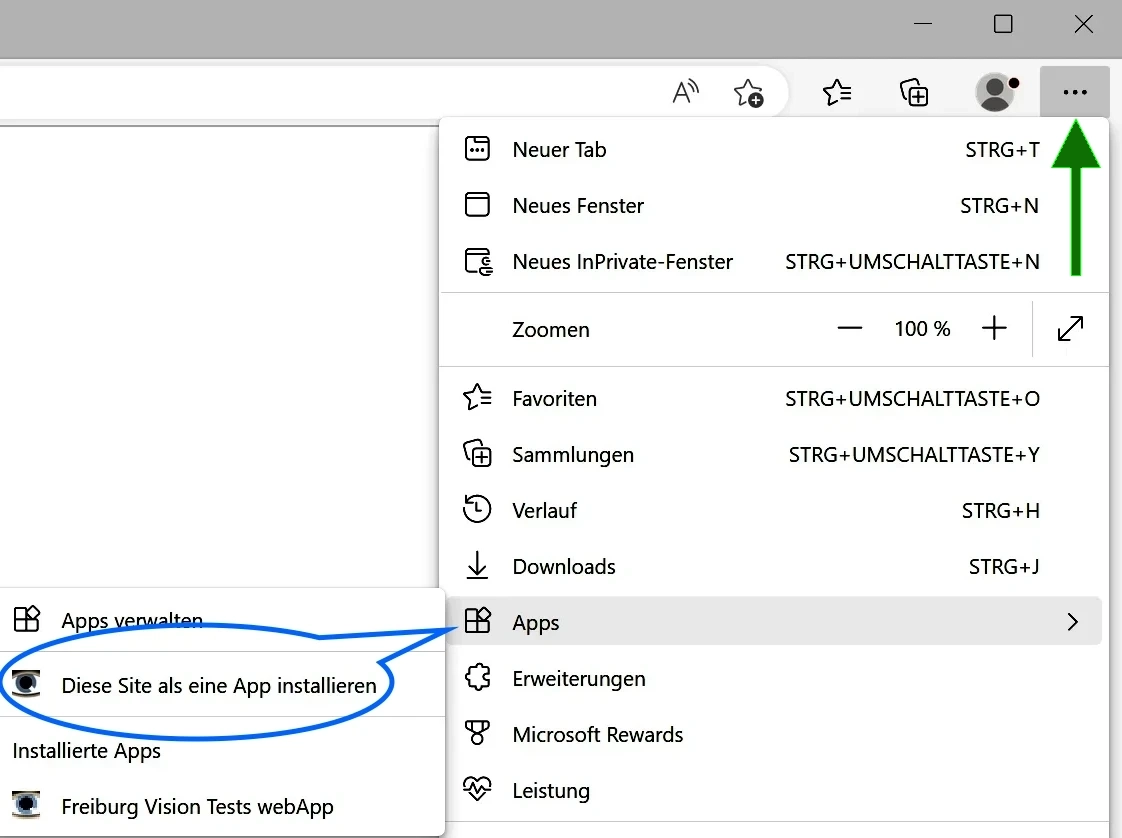
FrACT₁₀ is a Progressive Web App (PWA, →details). Thus, once installed, it can run without internet access. Installation details depend on OS and browser:
First open it in its own window/tab (or open a “frozen” version) and look for your browser’s ‘3 dot menu’ on top right (or ‘sandwich menu 𑁔’):
| Chrome/Brave · MacOS | Chrome/Brave · Windows | Edge · Windows/MacOS |
|---|---|---|
 |  |  |
3 dots ︙ | ··· | |
| Or whatever, keeps changing all the time… | ||
- In all cases, the Progressive Web App will be saved here: «user»/Applications/…
- Other desktop browsers
- Safari (MacOS ≥ Sonoma):
File ⏵ Add to Dock … - Firefox supports Progressive Web Apps (“Taskbar Tabs”) on Windows but not yet on MacOS (there you can use “PWAsForFirefox”)
- Safari (MacOS ≥ Sonoma):
- Linux: depends on your specific flavor. I found various recipes, e.g. for “Web App Manager”
- iOS:
AddtoHomeScreenin theSharemenu and proceed as suggested - Android: depends on the specific brand.
Who uses FrACT?

Over 1800 papers cite FrACT, see adjoining figure.
Examples in clinical trials: Zrenner et al. 2010, Stingl et al. 2013, Stingl et al. 2021, Chang et al. 2022, Palanker et al. 2022, Nanoscope’s RESTORE trial (Mohanty et al. 2025).
Recommended in this review: Schmetterer et al. 2023. Also used by NASA (PDF).
FrACT is used as an outcome measure in these registered trials (compiled 2026-01):
NCT07107646, NCT06891443, NCT03913143 NCT03326336, NCT01312662, NCT00515814, NCT01024803, NCT01497379, NCT01614158, NCT01673503, NCT01876147, NCT02391298, NCT02720640, NCT03392324, NCT04111068, NCT04184037, NCT04284293, NCT04417959, NCT04642495, NCT04762368, NCT04945772, NCT04919473, NCT05655689, NCT05921162, NCT06425666, NCT06704737.
Requirements:
System and Equipment
- FrACT₁₀ online: Any computer with Android, MacOS, Linux, or Windows 10/11, plus any modern browser. Tablets are fine, most smartphones too small.
FrACT₁₀ Progressive Web App:see above
- Any modern visual display unit (monitor). Its dimensions and pixel size determine the accessible acuity range. With a 4k monitor, you can cover ≈2.5 through –0.3 LogMAR without changing distance.
- Single or multimonitor systems are fine. The FrACT₁₀ progressive web app can be moved to a 2nd monitor and remembers this setting.
- For remote input there are two options
- locally: see the response box below in Usage Details
- internet-mediated: response via smartphone.
Test-retest variability = Precision.
And what about Repeatability, Reproducibility, and Accuracy?
- Good sources on this topic
- British Standards Institution (1987) Precision of Test Methods Part 1. Guide for the Determination of Repeatability and Reproducibility for a Standard Test Method by Inter-laboratory Tests (BS 5497-1:1987 ≙ ISO 5725:1986), p 1
- ISO 5725-1:2023, in Introduction (not behind a paywall).
- Precision, as defined above and in Wikipedia, refers to the variability observed in repeated tests and encompasses two aspects:
- Repeatability: quantifies precision in tests performed during a short interval of time in one laboratory by one operator using the same equipment.
The repeatability value r according to the British Standards Institution is defined as the value below which the absolute difference between two single test results may be expected to lie with a probability of 95%. It can be quantified with the 95%-confidence interval (CI95) of the Bland-Altman Limits of Agreement (LoA). For example, a CI95 of ±0.2 LogMAR indicates that in 95% of the cases, results will fall within a ±2 lines range. - Reproducibility: quantifies precision in tests performed under different conditions, e.g. in different laboratories.
Thus: reproducibility ≥ repeatability (usually).
- Repeatability: quantifies precision in tests performed during a short interval of time in one laboratory by one operator using the same equipment.
- Accuracy, also called “trueness”, describes how close measurements are to their true value; a difficult concept in visual acuity. Thus, we fall back to operational definitions: Acuity X is what test x measures.
FrACT’s variability has been documented across various studies, as outlined below. Conclusion: The 95% confidence interval of FrACT’s LoA is ≲ ±0.2 LogMAR in patients/participants with acuities of hand movement or better. If you want lower (better) variability, increase the number of trials beyond 18 [roughly a 1/√n dependence, see Bach (2024)].
| Source | n | range [LogMAR] | trials | 95% LoA [LogMAR] |
|---|---|---|---|---|
| Bach 2024 | 90 | 1.22 to -0.59 | 18 | ±0.171 |
| " | " | " | 24 | ±0.168 |
| " | " | " | 32 | ±0.158 |
| " | " | " | 36 | ±0.141 |
| " | " | " | 42 | ±0.128 |
| " | " | " | 48 | ±0.120 |
| Barone et al. 2024 | 50 | >1.9 | ±0.2 | |
| Freundlieb, Kramer, Herbik, Bach, Hoffmann 2020 | 10 | ≤ 0.0 | 18 | ±0.15 |
| Reiniger, Lobecke, Sabesan, Bach, …, Harmening 2019 | 31 | –0.4 to –1.1 | 24 | ±0.18 |
| Bach, Schäfer 2016 | 86 | 1.04 to –0.37 | 18 | ±0.22 |
| " | " | " | 24 | ±0.19 |
| Hertenstein et al. 2016 (acuity measured twice in 40) | 40 | 0.33 to –0.28 | 18 | ±0.20 |
| Bach 2007 | 74 | 0.65 to –0.37 | 18 | ±0.19 |
| Lange, Feltgen, Junker, Schulze-Bonsel, Bach 2009, CF | 15 | 2.3 to 1.5 | 30 | ±0.15 |
| " , category HM | 15 | 2.5 to 2.0 | 30 | ±0.20 |
| Schulze-Bonsel, Feltgen, Burau, Hansen, Bach 2006, CF | 6 | 1.9 to 1.8 | 30 | ±0.15 |
| " , category HM | 11 | 2.4 to 2.0 | 30 | ±0.17 |
CF: counting fingers, HM: hand movement (→how to derive quantitative values for these).
The above values for the 2006, 2007, 2009 & 2016 studies are based on re-analysis of the original data sets because formerly I used decimal acuity and idiosyncratic measures of variability, obnoxious to convert.
Statistical Intricacies
- To evaluate test-retest variability, a common approach involves calculating a correlation (e.g., ICC). However, this method is inappropriate because correlations are range-normalized (e.g. McAlinden, Khadka & Pesudovs (2011) Statistical methods for conducting agreement (comparison of clinical tests) and precision (repeatability or reproducibility) studies in optometry and ophthalmology.). Simply adding one very poor acuity and one very good acuity (extending the range) will automatically yield a misleadingly high correlation coefficient, see: Holopigian & Bach (2010) A primer on common statistical errors in clinical ophthalmology. [→PDF]. Therefore, I employ Bland-Altman’s (1986) limits of agreement (LoA).
- The British Standards Institution’s / ISO’s repeatability value r (the “repeatability coefficient” in Bland-Altman 1999) happens to have the same value as LoA when there are two measurements per eye and no bias (thanks UG! This deserves a brief paper in its own right because the Bland-Altman papers are so arcane) (Bland-Altman 1996).
- Most of the time, I find a tiny bias in vision assessment: The second run’s acuity is a wee bit better, probably due to learning. Since the bias is not significant, I average the upper and lower LoAs, arriving at the single number for LoA as given in the table above.
Usage Details
If you ran a previous version, all selections in Settings may automatically be reset to defaults (depends on the exact version). To avoid losing carefully composed settings, use the Export All Settings button and save the resulting file. On version change, you can re-import.
How to calibrate?
Very easy: Enter the width of the calibration bar (easiest with plastic card) and the observation distance in the Settings▸General interface. Be sure to have enough distance from the screen, so pixel resolution does not limit acuity. Also consider other entries in Settings; the defaults cannot be optimal for every situation. The Checklist is a must-read; in the FrACT₁₀ Manual all settings are explained, probably in more detail than you wished…
For the Contrast Test, you also need to go to Settings▸Gamma. There you can interactively linearise the luminance transfer function (“gamma correction”) before testing. But see below for a cautionary note on the difficulties of contrast testing. Or use a screen calibrator (see What is special about the Contrast Test?).
All selections in Settings are automatically saved.
Starting the test
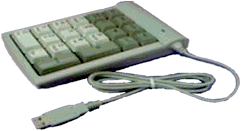
Apart from using the obvious buttons, a test run can also conveniently be started from the numerical keypad (digit “5”). Enter the position of the appearing optotypes orientation via the numerical digit keys, or use the alternatives. The digit key “5”, pressed twice, aborts an ongoing test run (and inhibits display of the premature result). In Settings, you can select which test starts on “5”.
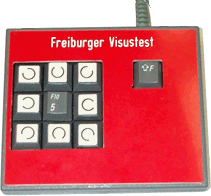
Response box
Working with patients, you may want to enter results yourself. In vision experiments, participants typically enter their responses themselves.
The two examples here are for Landolt rings with their 8/4 alternatives as optotypes. For Sloan letters, any standard keyboard is fine (Bluetooth-coupled allows distance).
Responses can also be entered via a smartphone (internet-mediated), see →response via smartphone.
Number of trials?
- First, this depends on the number of choices with your chosen optotype: Sloan letters have 10 choices, Landolt rings 8 or 4, gratings 4 or 2, Vernier lines 2.
- The default number of trials is set to 18 with 8/10 choices, 24 with 4 choices, and 32 with 2 choices. A paper on this: Bach M (2024) Freiburg Vision Test (FrACT): Optimal number of trials?
- For scientific applications, rather than increasing the number of trials, it is best to repeat each condition (e.g. each eye at 18 trials, ideally in an ABBA scheme) and take the mean; this also allows for test-retest quality quantification.
- Why are all the above trial numbers divisible by 6? Because every 6th trial is a “bonus” or “easy” trial (if enabled), where the optotype is presented at 3 times its current threshold estimate. This keeps your participants happy, especially since the last trial is thus always a ‘success’ experience.
4 or 8 gap positions, or 10 letters?
Sloan Letters have 10 alternatives, Tumbling E has 4 possible orientations, for the Landolt ring there are 4 or 8. Depending on your application, you may wish to use only the 4 primary Landolt gap positions or to supplement it with the four oblique directions; FrACT allows both. Briefly: 4 directions are less easily confused, but guessing probability is higher, thus requiring more trials; 8 positions allow more rapid determination of visual acuity (less trials) as the guessing probability is lower. Final outcome should be identical, but the number of runs must be adequately chosen; see previous item. The letters are the standard Sloan letters, the Sloan letter “C” is physically identical to the Landolt ring at the same acuity grade.
Results Export
The test result is presented on the screen in formats as chosen in Settings▸Acuity▸Formatting. Additionally, the result can be transferred to the clipboard (in a simple, final-result-only or full-history fashion); so just switching to a spreadsheet program running in the background allows pasting and archiving the result. Advanced export options are detailed here: FrACT₁₀ Manual⏵Exporting.
What is special about the Contrast Test?

Experience has shown that contrast testing is technically more demanding than acuity testing.
- Avoid stray light falling on the screen; a “monitor hood” may be sufficient.
- Be sure to linearise luminance (“gamma correction”) before you test contrast (go to
Settings▸Gamma); the best approach is to employ a screen calibrator (I’m using the Spyder). Choose a gamma value of your liking (e.g. 1.8 or 2.0) and calibrate the screen/computer to that value; then set it thus inSettings▸Gammain thegammavaluefield. - Normal contrast vision is better than normal screen luminance resolution (256 steps are not enough, especially after losing a bit or two via linearizing (“gamma correction”)). This is solved via dithering (Bach (1997) Anti-aliasing and dithering in the “Freiburg Visual Acuity Test”. Spatial Vision 11:85–89).
Mirroring, or more generally, “Display transforma”
In many environments, the standard 4 m distance may be difficult to achieve. In such conditions, high-quality front surface mirrors can extend the effective viewing distance. Their image-flip can be compensated for through Settings▸Display transform.
Shortcuts
I am lazy and prefer to start actions without mousing; thus, I added a number of shortcuts, see also FrACT₁₀ Manual or classic FrACT3.x Manual [PDF]. Casing is irrelevant for shortcuts.
| Shortcuts FrACT₁₀ | |
|---|---|
| Key | Action |
| L | Run Acuity▸Sloan Letters |
| C | Run Acuity▸Landolt ring |
| E | Run Acuity▸Tumbling E |
| A | Run Acuity▸Auckland Optotypes (TAO) |
| V | Run Hyperacuity▸Vernier lines |
| 1 | Run Contrast threshold▸Sloan Letters |
| 2 | Run Contrast threshold▸Landolt rings |
| 3 | Run Contrast threshold▸Tumbling Es |
| G | Run Gratings |
| S | Settings |
| F | Fullscreen toggle |
| 5 | Run as selected in “Which test on five” |
| 55 | Abort current run |
| H | Help |
| Q, X or - | Quit = eXit |
Avoiding more mousing: Use the tab key (⇥) to move between fields in Settings (shift-tab for backwards). The blue 🆗 button is activated by the return key.
Clinical trials
Clinical trials require substantially higher levels of rigor compared to the guidelines outlined in the Checklist. These trials will be professionally managed, and I’ve had the pleasure of collaborating with numerous exceptional clinical scientists, statisticians, and other experts setting up FrACT in clinical trials. Many of my suggestions will state the obvious and appear in random order; they’re not intended to be exhaustive.
- Run every condition twice. That yields a quality marker (measure of reproducibility, e.g., the Bland-Altman limits of agreement), then average for any further processing.
- After you have established all desired settings (that differ from FrACT’s defaults), let’s make a PRESET for your study (possibly combined with
Auto Preset…). This ensures reproducible settings across time and centers. Or build your own. - Document the version of FrACT, don’t change it during the course of your study (see “frozen” above). For documentation of all settings used, you can employ
Settings▸ExportAllSettings. - If it’s an (ultra) low vision study: See this FAQ section on low vision.
- For every session, apply your preset, check luminance of the VDU, and verify size calibration (with “plastic card”).
- Establish a reproducible way to ensure a well-controlled observation distance.
- For documentation and 21 CRF Part 11 compliance: Use the
Result→PDFbutton after every run (can be automated). InSettings▸Miscthere are fields for ID and tested eye which are included in the PDF output (or any other export). - Make use of automated results export / integration with your hospital documentation system. Never transfer a result manually.
- Make yourself independent from this website: Install a “frozen” version of FrACT₁₀ as a progressive web app, or run it from your own servers, as described in Long-term support.
- FrACT in standard form might not be permitted by regulatory bodies because its settings are accessible to technicians and patients. Two approaches can lock down FRACT:
- Use
Settings▸Misc▸Automaticallyapply…presetto automatically apply your specific Preset on every startup or reload. This ensures that every result is obtained under standard settings and works best if the calibration can be included in the Preset. - Or: drive FrACT solely with HTML messages. Implement a “Start test run” button in your software which sets all settings to your standard and then initiates the test run. This functionality is used by the
DemorunandSoftwaretestbuttons above. That way it is even possible to completely lock all settings (contact me for info).
- Use
- Don’t hesitate to contact me: bach@uni-freiburg.de; I’m open for consulting based on sizable experience.
Long-term support
Motto: Progredere, sed nihil frange¹.
FrACT began 41 years ago and is available on the Internet in various forms for 31 years now. I am committed to providing support for decades (within my physiological limits😎). “Classic” FrACT was last (and finally) updated in 2020, and will continue to work in the two major operating systems due to its 64-bit architecture.
FrACT₁₀ evolved from FrACT to run within web browsers for online testing and in 2023 grew into a Progressive Web App (blog). This makes FrACT₁₀ accessible on all platforms, both online and offline, and allows for automatic updates.
- To run the most recent FrACT: Use it online (top of this page), or install the Progressive Web App from here. Whenever I update FrACT₁₀, your Progressive Web App will automatically update in the background: Give it ½ minute, then reload, voilà! A progressive web app, once installed, can run without internet access.
- To run a stable version for long-term usage: For studies, clinical trials, student assignments, ESU etc., run a “frozen” version. Frozen versions isolate you from bugs that might pop up in the newest version; they will remain on this server for years, even if I remove the direct links to them. This is advised for most uses of FrACT.
- For a long-term stable version and without needing internet (best choice): Install the Progressive Web App from a “frozen” version. Even if you clear your browser caches, the Progressive Web App will reinstall the same version automatically on the next internet connection.
- To make yourself completely independent from me: Install all files at an HTTP server of your own, like so:
Go to https://michaelbach.de/fract/FrACT10/FrACT/ (or a frozen version of your choosing). Download the entire contents of that directory (≈15 MB; e.g., with a “site sucker”, or ask me for a zip) to an appropriate location on your HTTP server. Then open theindex.htmltherein and lo, FrACT₁₀ now runs from your own server and will not change through new developments until you choose! - Source code: FrACT₁₀’s code is available as open source on GitHub (commit history). So even if I don’t, FrACT₁₀ will live on 😎.
- Diagnosys LLC will provide a certified commercial version with optional on-site support.
¹Advance, but don’t break anything.
Coding Best Practices (GxP)
While FrACT began as an informal academic side-project (History below), its widespread adoption entailed rigorous quality control.
- Quantitative correctness of the optotype geometry. This is easily verified on the screen with a ruler and a little trigonometry.
- To make this easier, you can use this procedure:
At a distance of 57.3 cm, one degree of visual angle corresponds to 1 cm. Multiply this with 6 (degrees vs. minutes) and set the resulting 344 cm as the testing distance. Calibrate the ruler (e.g. with plastic card), then:
→ 1 millimeter on the screen corresponds to one minute of arc. Use tumbling E for easy measurement, and if you have theStartingLogMARat 1.0, the first optotype’s stroke width should be 10 mm. Or, easier to measure, the full size of the E should be 5 cm. - For very low acuity, when converting between angle 𝛼 and screen pixels x, this is the correct formula
x = 2 · distance · tan(𝛼 / 2), and not: x’ = distance · tan(𝛼).
(Maybe not that important: the difference between x and x’ is less than 1% at 50 cm observation distance and lower with larger distance.)
- To make this easier, you can use this procedure:
- Quantitative correctness of the threshold outcome. This was done by controlled comparisons to chart testing in my lab and in independent laboratories.
- Version / Change Control. The code for FrACT₁₀ is open source. Issues and their resolutions are tracked with git; see FrACT₁₀’s commit history (history of classic FrACT below).
- Documentation Practices. The code strives to be self-documenting through descriptive long variable / method names; a detailed manual describes everything; all changes are tracked and available on GitHub.
- Data Management.
- Confidential user-traceable data is neither recorded nor stored by FrACT itself.
- Settings are reproducible and traceable via
PRESETSor viaExport/ImportAllSettings. - Result data integrity is facilitated via automated export mechanisms (=no typos).
- Low-level programming practices can only be mentioned in passing here:
- Robustness. The Settings dialog is augmented with plausibility checking of the input values. E.g., when a numerical entry has incorrect number formatting or is set to an incompatible value, the parameter is reset to its default.
- Systematic code modularization
- Software testing suite, unit testing
- Automated GUI end-to-end testing with Cypress
As is well known, any interesting computer program cannot be shown to be entirely correct, and usually isn’t. Thus, the ongoing validation by independent and critical users is very important. Thank you! All pertinent comments welcome. Also see Bugs? below.
How do I cite it?
Glad you asked! If you used FrACT for your research, please cite it.
- Bach et al. 2026 Visual acuity: single-run confidence interval obtained via bootstrapping, implemented in the Freiburg Vision Test. Graefes Arch Clin Exp Ophthalmol (most recent)
or - Bach M (2024) Freiburg vision test (FrACT): optimal number of trials? [PDF]
or - Bach (1996) The “Freiburg Visual Acuity Test” – Automatic measurement of visual acuity. Optometry and Vision Science 73:49–53 [PDF] (the “generic” paper)
or - Farassat N, Jehle V, Heinrich SP, Lagrèze WA, Bach M (2024) The Freiburg Acuity Test in preschool children: Testability, test–retest variability, and comparison with LEA symbols. Transl Vis Sci Technol 13:14.
Also, please mention the version plus release date (top right, can be copied from there).
The briefest way to refer to the present page (its URL):
https://michaelbach.de/fract/
Descriptions & Validations
- Jolly et al. (2019) A Randomized Crossover Study to Assess the Usability of Two New Vision Tests in Patients with Low Vision. Optomet Vision Sci 96(6): 443–452 [comparison of the Berkeley Rudimentary Vision Test (BRVT) & FrACT]
- Bach & Schäfer (2016) Visual acuity testing: feedback affects neither outcome nor reproducibility, but leaves participants happier. PLOS ONE 11(1):e0147803
- Tsai L, Thomas E, Tarrant J, Bentow S, Kasthurirangan S (2015) A Comparative Clinical Evaluation of Two Visual Acuity Testing Systems: ETDRS vs. FrACT. IOVS 56:3890 [meeting abstract]
- Tarrant J, Thomas E, Tsai L, Kasthurirangan S (2015) Evaluation of defocus curve performance with two visual acuity testing systems: ETDRS and FrACT. IOVS 56:3891 [meeting abstract]
- Kollbaum, Jansen, Kollbaum, Bullimore (2014) Validation of an iPad test of letter contrast sensitivity. Optom Vis Sci 91:291–296 [Contrast, comparison of Pelli-Robson, FrACT, and a new iPad test]
- Kurtenbach, Langrová, Messias, Zrenner, Jägle (2013) A comparison of the performance of three visual evoked potential-based methods to estimate visual acuity. Doc Ophthalmol 126:45–56 [Acuity, comparison of FrACT and ETDRS]
- Lange, Feltgen, Junker, Schulze-Bonsel, Bach (2009) Resolving the clinical acuity categories “hand motion” and “counting fingers” using the Freiburg Visual Acuity Test (FrACT). Graefe’s Arch Clin Exp Ophthalmol 247:137–142 [→PDF] [Acuity, ETDRS & FrACT in very low acuity]
- Bach, Schulze-Bonsel, Feltgen, Burau, Hansen (2007) Author Response: Numerical Imputation for Low Vision States. IOVS, eLetter Aug 2007 [Acuity]
- Bach (2007) The Freiburg Visual Acuity Test – Variability unchanged by post-hoc re-analysis. Graefe’s Arch Clin Exp Ophthalmol 245:965–971 [→PDF] [Acuity, methodology]
- Bühren, Terzi, Bach, Wesemann, Kohnen (2006) Measuring contrast sensitivity under different lighting conditions: Comparison of three tests. Optom Vision Sci 83:290–298 [Contrast]
- Schulze-Bonsel, Feltgen, Burau, Hansen, Bach (2006) Visual acuities “hand motion” and “counting fingers” can be quantified with the Freiburg visual acuity test. IOVS 47:1236–1240 [Acuity, ETDRS & FrACT in very low acuity]
- Dennis, Beer, Baldwin, Ivan, Lorusso, Thompson (2004) Using the Freiburg Acuity and Contrast Test to measure visual performance in USAF personnel after PRK. Optom Vis Sci 81:516–524 [Contrast]
- Terzi, Bühren, Wesemann, Kohnen (2004) Frankfurt-Freiburg Contrast and Acuity Test System (FF-CATS) – A new test to determine contrast sensitivity under variable ambient and glare luminance levels [Article in German]. Ophthalmologe 102:507–513 [Acuity]
- Loumann Knudsen L (2003) Visual acuity testing in diabetic subjects: the decimal progression chart versus the Freiburg visual acuity test. Graefes Arch Clin Exp Ophthalmol 241:615–618 [Acuity]
- Neargarder, Stone, Cronin-Golomb, Oross 3rd. (2003) The impact of acuity on performance of four clinical measures of contrast sensitivity in Alzheimer’s disease. J Gerontol B Psychol Sci Soc Sci 58:54–62 [Acuity]
- Wesemann (2002) Visual acuity measured via the Freiburg visual acuity test (FVT), Bailey Lovie chart, and Landolt C chart [Article in German] Klin Monatsbl Augenheilkd 219:660–667 [Acuity]
- Bach (1997) Anti-aliasing and dithering in the “Freiburg Visual Acuity Test”. Spatial Vision 11:85–89 [Methodology]
- “Generic description” Bach (1996) The “Freiburg Visual Acuity Test” – Automatic measurement of visual acuity. Optometry and Vision Science 73:49–53 [PDF] Also consider the FrACT₁₀ Manual or classic FrACT3.x Manual [PDF] which describes all options [PDF]
General Pertinent Sources
- Lieberman & Pentland (1982) Microcomputer-based estimation of psychophysical thresholds: The Best PEST. Behavior Research Methods & Instrumentation 14:21–25
- Newman & Sproull (1979) Principles of Interactive Computer Graphics. New York, McGraw-Hill, Inc.
- Metha, Vingrys, Badcock (1993) Calibration of a color monitor for visual psychophysics. Research Methods, Instruments, & Computers 25:371–383
- Mittelviefhaus, Bach, Jedynak, Kommerell (1993) Der Freiburger Visustest. Ophthalmologe 90:1320–135
- Pentland (1980) Maximum likelihood estimation: The Best PEST. Perception & Psychophysics 28:377–379
- Petersen (1990) Zur Fehlerbreite der subjektiven Visusmessung. Fortschr Ophthalmol 87:604–608
- Treutwein (1995) Adaptive Psychophysical Procedures. Vision Res 35:2503–25
- World report on vision (includes definitions from impairment to blindness)
- Bach (1997) Anti-aliasing and dithering in the “Freiburg Visual Acuity Test”. Spatial Vision 11:85–89
A brief history of FrACT, “classic” and the current FrACT₁₀
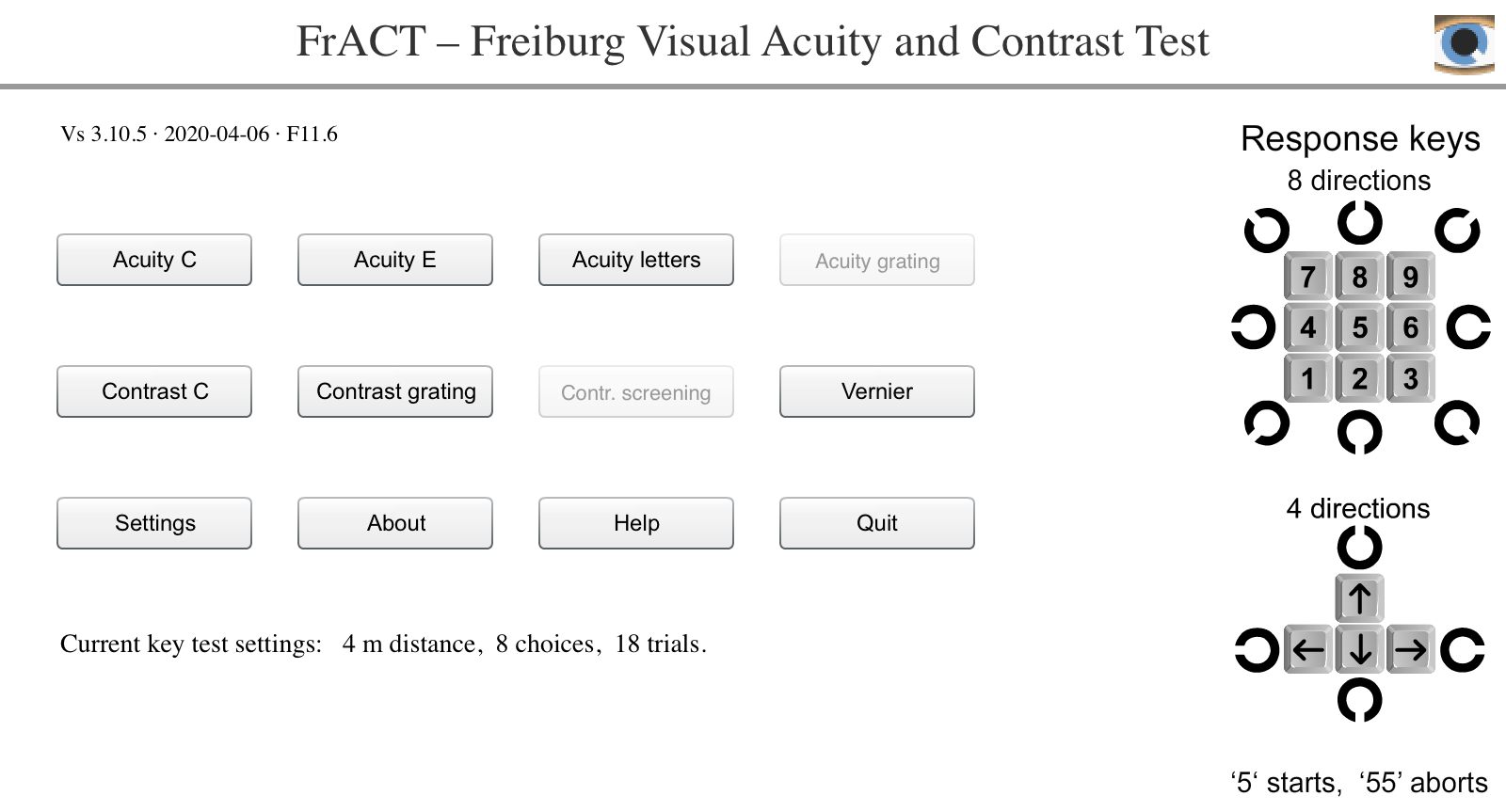
This image of “classic FrACT” shows the app’s main screen when running the downloaded stand-alone version.
It will continue to work for many years, but going forward only FrACT₁₀ will be developed further.
Do not use this for new projects.
In 1985, I programmed the first version, using a custom-built Z80 CP/M computer with a graphics board based on the NEC 7220 graphics chip, using serious digital differential algorithms (Newman & Sproull, 1979) in assembly language just to draw the Landolt ring. It became more than a curio after porting to Pascal and incorporation of the Best PEST threshold algorithm (Lieberman & Pentland, 1982) [nowadays one would call this Bayes-based] and was routinely employed in my lab to screen subjects’ acuities before experiments.
The port to the Macintosh in 1992, translating from Pascal to C++, facilitated the use of anti-aliasing (Bach, 1997), which immediately made the measurements more precise (by allowing intermediate pixel values) and enabled a higher acuity limit at practical distances.
In 1996, the first Internet version was made available after adding gamma correction for better quantitative definition. Rich user feedback spurred many bug fixes and feature expansions, paving the way from a ‘hobby’ to a professional application, now validated in independent laboratories.
The pressure of requests finally motivated me in 2002 to port the program to an operating system-agnostic environment, for which I chose ActionScript/Flash (formerly Macromedia, acquired by Adobe). Consequently, the program then ran in near-identical fashion on the Macintosh, Linux, and Windows operating systems for nearly two decades.
Anticipating the demise of Flash, in 2020 I ported the program to a JavaScript-based framework (Cappuccino); thus it runs on all platforms, including tablets. In 2021, FrACT₁₀ achieved parity with the last “classic” FrACT3.10.5 and its code was open-sourced. In 2022 the browser-only FrACT₁₀ was complemented by apps for macOS & Windows, based on Electron. In 2023 the install hassles of apps were resolved by packaging FrACT₁₀ as a Progressive Web App for all platforms.
In 2024, I implemented HTML messages to control FrACT₁₀ and read/write its Settings and more; this facilitates automation and embedding FrACT₁₀ in larger systems. In 2025–2026 many features were added to better adapt FrACT for use in clinical studies. In 2026, Diagnosys LLC licensed FrACT and will offer it in certified incarnations with optional on-site support.
Version history of classic FrACT
| 2020-04-05 | 3.10.5 | · Vernier: contrast now adjustable, higher max possible values, better shape parameterisation (for MBH & JR) · reward pictures also for Letter and Vernier acuity · no more “contrast screening” · masking now works again (thanks, DH) · corrected “VA Snellen Letters” to “VA Sloan Letters” ( thanks, KW) · [internal: ‘var’ → ‘const’ where possible] |
| 2019-05-10 | 3.10.2 | · added “bonusEmoji” [Settings▸reward pictures (top right). Recommended] · block-randomiser, now fully ISO/DIN compatible for oblique directions · added ETDRS to crowding, crowding choices also now work for Letters · stimulus sequence, all VAs: 0.1 / 0.2 / 0.4 now also 0.8, same ×2 for contrast · added ceiling/floor detection for acuities: rangeOK, atFloor, atCeiling · added field for possible range limit in 1st results line · added “secondsPresentation” to results export · added cpd info to contrast grating results · added contrast info to acuity results · removed feedback info from results (no longer necessary) · added header line for full history in results · Vernier ceiling: 1000 → 3000 arcmin (request by MBH) · fixed occasional Øsaving in luminance linearisation (thanks, SPH) · partial fix of crashes in FrameCalCheck after any test (thanks, OKolbe) |
| 2018-02-14 | 3.9.9a | · button Settings▸Kg. → to ESU (Einschulungsuntersuchung) · now ignoring the modifiers: command, control, shift, tab · for ContrastLandolt choice of fixed pedestal luminance (for SPH) · Spezial Aalen: fester Visus (deactivated in standard edition) · fixed: in Contrast Grating, the #of choices was always 4 (thanks, SJAnderson) · CHANGE: inappropriate keys now interpreted as incorrect response · fixed regression in persistent history (3.9.8→3.9.9) · moved “Kindergarten” to a button in Settings, pertinent code → Prefs · added “FrACT3_lastTrialResult.sol” (for Leipzig collab.) · displayTransform: works with contrast-C, (2) & letter “S” |
| 2016-10-27 | 3.9.8 | · trialInfoFontSize: default→9, kindergarten→24, · Quit/eXit via “Q” or “X” · more selections for spatial frequency (on request by Zeiss) · more crowding options · Vernier: contrast can be inverted, added type (3-line etc.) & scale (for low vision) · added sounds for stimulus on/off · shape corrections for Sloan letters K and S (error in Pelli’s Sloan font) · rewrote the squarewave grating for less aliasing |
| 2015-06-01 | 3.9.3 | · “z” entry could be interpreted incorrectly in Letter Acuity depending on locale (was a QWERTZ vs. QWERTY problem) |
| 2015-04-24 | 3.9.2 | · more options for crowding · added logCS(Weber) to optotype contrast results · improved color picker behaviour (minor bugfix) |
| 2015-01-28 | 3.9.1 | · corrected incomplete random assignment for letters · added one more option to crowding (now first is better named as “flanking rings”) · corrected missing result info on normal trial exit (a regression in 3.9) |
| 2014-11-24 | 3.9 | · added optional incomplete runs (→modified format of export2clipboard) · VA tracking now works (no longer using Pest, thanks Ross!) · added kVersionPraeventiometer · added “Kindergarten” screening preset |
| 2014-04-15 | 3.8.2 | · harmonised choices in “Which test on 5” · systematic treatment of excentric presentation across tests · maxVAdecimal now takes the thresholdtype setting into account (a little higher if not DIN) |
| 2013-11-29 | 3.8.1 | · extended & generalised visual feedback situation · feedback optotype red with reduced contrast · sequence: first auditory, then the visual feedback · updated gamma value now stored without needing to click a button (thanks, Nia) · possible to have no result displayed at all (to avoid subject influencing) · tried to really hide mouse cursor (Flash player bug) · largest Landolt ring little smaller, margin one full gap until screen edge (thanks, Mark) |
| 2013-06-18 | 3.8.0e | · renamed “FrACT3_preferences_history.sol” to “FrACT3_preferences_trialHistory.sol”, same for the class · changed type of “precision” in the rStrN* class to int · “whichTestOn5” now defaults to acuity in the internal case construct · removed the (by now) obsolete “T” option |
| 2013-03-27 | 3.8.0d | · removed hi-res timestamp from results, increased displayed precision of results, added distance to results, units for Landolt ring contrast in Weber · added 1500 ms background mask (for Ralf Kredel) · default number of trials reduced to 18 (8 choices) and 24 (4 choices) based on recent study |
| 2012-12-07 | 3.8.0 | · added grating acuity (useful only for low vision!) · display transform now also works with tumbling E and with Sloan letters (thanks to Paul Artes) · harmonized terminology across tests; · Vernier clipboard results now in arcsecs; ISO date form |
| 2012-06-19 | 3.7.4c | · improved color bit stealing & added to GUI · added simplified bit-stealing (Tyler1997SpatVis) · introduced “dir2”-pref to switch between hor/ver which is, in principle, more versatile · increased the z-mode callback to 50 (for Liz) · added tracking mode for contrast · added testType to the persistent history · grating: added some Gaussian windowing and made patch-diameter a user-defined setting. |
| 2011-10-27 | 3.7.1b | • added grating test as requested by Jens • added timestamps (milliseconds since 1970) to the full history • [3.7.m special version for Paik with long Verniers (40x longer)] |
| 2011-04-29 | 3.7l | preview, work in progress • added display transformations: mirroring vertically and 180° • dealt with blocked information storing (due to new Adobe settings) • new flash player module (10.2 with 3.7l) • added “Contrast screening” – calibration accessible via shift key, changed sequence logic, now respects the number of orientations (4/8) • corrected threshold for “red condition” acuity warning in Settings • added visual feedback (growing optotype) • rearranged value/label placement on the Settings screen, main screen buttons, response key graphics • removed display size from key settings (caused misunderstanding) • changed default contrast-dia 30→50 arcmin, max 300→999 • internal class rearranging (Landolt ring→Optotypes) • various minor improvements • added face files |
| 2010-09-01 | 3.6.3 | • corrected Michelson→Weber contrast calculation: the previous Weber value had been c·W%-times too high (e.g. 1.01% instead of 1.0%, 11% instead of 10%, etc.). Thanks to Prof. von Handorff and his students for spotting this. • This is the last version that runs on Mac OS/PowerPC. |
| 2010-07-29 | 3.6.2 | • added tumbling E • added optional online trial info • added persistent history (copied to clipboard with “z”) • modernized writing to the clipboard • centered parameter-input in the Settings frame • solved problem of not being able to enter “5” into the subjectID field |
| 2010-03-21 | 3.6beta | • Quit button now labelled “Exit” in Windows • added TCP/IP-based results transmission • deleted the flawed and effectless manipulation of presented direction depending on response correctness • added face recognition paradigm (experimental) • improved Alert class from <fatal-exception.co.uk/blog/> • for FrACT letters the history is now correctly exported, with the letters. Checked Landolt ring and Sloan C size, they are identical, as should be. |
| 2009-11-11 | 3.5.5 | Quite a number of tiny improvements: • added screen dimension to main screen info • added “force Snellen denominator to 20 ft” on request • added option for colour Landolt rings on request • set uncalibrated values bold & red in the Settings screen to make them more obvious • set focus to stage (now it responds to keyboard shortcuts after returning from Settings etc.) • now possible to start with numkey-5 irrespective of numlock setting |
| 2009-09-16 | 3.5.4 | made the calibration bar blue; increased PEST-grain from 500 to 5000; added contrast with Weber definition; improved manual |
| 2009-08-20 | 3.5.3 | • fixed background glitch, a regression from the new contrast polarity setting • rearranged the setup a little around the calibration bar |
| 2009-07-19 | 3.5.2 | • added option to set contrast polarity • fixed silly error (fixation target in contrast testing staying on) introduced recently • added option not to go full screen (this can help with multiple screen setups) |
| 2009-05-27 | 3.5 | • fixed errors in the calibration check GUI resulting from the new mask code • renamed “Preferences” into “Setup”, put key settings on main screen [all thanks to Daphne McCulloch’s thoughtful suggestions] |
| 2009-04-21 | 3.4.3 | • Improved coding around the sound channels (fixed the ‘hang’), cleaned up the Pest code (no performance change, just more elegant :) ) • Added detection of sound capabilities and disabled sound settings when appropriate (does not seem to work correctly) • Added a blank (or grey for contrast) mask after the response key. Option in Prefs. Currently fixed at 200 ms. • Keypad now works without NumLock • Maximal distance increased (9999 cm instead of 999 cm), • Vernier size now scales with distance (as it should have): 0.5° total height, 0.5 arcmins bar sigma, 0.2 arcmins gap height • Separate timeouts for showing the optotype (down to 0.1 s) and for responding to it • and further trivia |
| 2008-12-08 | 3.3 | timeout > 30 seconds now possible (current maximum: 999 s); improved Flash version display; corrected a missing help button |
| 2008-11-16 | 3.2 | ported to Flash CS4, added calibration alert |
| 2008-09-10 | 3.1.3 | fixed a capitalisation issue in a sound resource now ignoring letter capitalisation in shortcuts |
| 2008-09-10 | 3.1.2 | added optional Sloan letters . Range-checked timeout-value (reported by Frank Schmidtborn, more fields need to be checked) |
| 2008-06-20 | 3.1 | All numerical preferences now range-checked corrected the logic in the response key evaluation (didn’t stop after first match). Added acuity based on Sloan letters. Rewrote response code to use key-value pairs. |
| 2008-05-30 | 3.0.4 | “auditory feedback when done” now preserved, made sound resources more generic, improved internal debugging |
| 2008-05-06 | 3.0.3 | Corrected time-out (error diagnosed by Frank Schmidtborn), added a positional jitter to vernier test (as suggested by Wolf Harmening) |
| 2008-04-26 | 3.0.2 | Complete re-write of FrACT, now called FrACT3. Reason for re-write was that I wanted to improve the contrast dithering. This entailed updating to the (totally underwhelming) Adobe Flash CS3 development system. This required changes in nearly every line of code. A major chore, which markedly improved the program internally, while not showing the changes externally. There is also a new icon, thanks to Inga. A comparison in 54 eyes found that acuity results differed between FrACT2 and FrACT3 by ≈0.01 LogMAR, thus below noise limit. Contrast testing is improved, the vernier test is being evaluated. |
| 2007-12-24 | 2.3 | fixed a bug of incorrectly formatted Snellen fractions under certain rare conditions |
| 2007-11-19 | 2.2 | re-enabled the “bonus trial” option for the contrast & Vernier test, improved FrACT documentation |
| 2007-10-30 | 2.1 | improved contrast dither for oblique orientations. Thanks to Hendrik Jungnickel at the Ammersee meeting! |
| 2007-07-25 | 2.0.5 | • Added 2 new sounds: (1) run done, and (2) incorrect response. Now I prefer the purely auditory feedback to the visual one. Give it a try! • Switch to Flash CS 3 with only few nasty side effects • Internal changes to the PEST procedure: code “beautification” without changes in the basic logic |
| 2007-06-02 | 2.0.3 | • Added a “which test on pressing ‘5’” option, changed contrast-Ø default to 30’ • Finally found how to abort using <esc> |
| 2007-05-23 | 202a | • There was a problem with the final contrast value in the “export to clipboard” record (thanks to Hendrik Jungnickel!) • Added sanity check for acuity formats. If all are switched off, decimal is switched on |
| 2007-04-11 | 2.0 | Contrast now employs dithering to achieve normal thresholds (currently using a 2×2 dithermatrix, increasing luminance resolution by a factor of 4). Added target cross for Contrast. Gamma adjustment via cursor keys, reference lines now use 0.5±0.3 luminance, thus avoiding the extremes, better for LCDs. |
| 2007-01-06 | 1.10 | Negative optotype contrast now works again (had been lost when making the program more robust with respect to non-sensible preference values, probably back around version 1.2) |
| 2006-11-30 | 1.9 | The smallest gap size had been reduced to 0.5 pixel. Tests now showed that this does not result in reliable optotype quality, and has been reset to 1.0 |
| 2006-11-15 | 1.8a | • Extended warning when the highest possible VA is below 2.0 • Vernier result now honors the preferred decimal point character • Rewrite of the contrast routines (help from Hendrik Jungnickel gratefully acknowledged): Correct setting of contrast and readback honoring gamma correction, back luminance clamped to 50%; “results2clipboard” now works with contrast; • contrast now also allows a position shift, added by request |
| 2006-10-01 | 1.6a | • Fixed decimal point internationalization, fixed tab sequence in Preferences • “Bonus trials” now have the setting {never | every 6th trial | always}, added by request. This allows to create a separate easy training version. |
| 2006-08-09 | 1.5a | • Added Vernier measurement (first attempt, feedback welcome) • Fixed error that had based the 4afc psychometric function on the 8afc guessing rate • Increased the default trial setting (now at 24 for 8 alternatives) The documentation does not yet reflect the Vernier addition – but it’s rather obvious to operate, methinks. |
| 2006-04-28 | 1.3 | • Allowed multiple combination of result formats (decimal, LogMAR, Snellen fractions), • Choose better ranges for rounding of decimal VA, • Switched off the distance information in the result string (anyone needs this?) |
| 2005-11-22 | 1.1.3 | Added “frame” (square + circular) to crowding options |
| 2005-11-21 | 1.1.2 | In “results2clipboard” trial number starts with 1, not 0; added “maxAcuity” in Prefs, framePrefs & Acuity |
| 2005-10-25 | 1.1 | added crowding flankers (on request of Bruce Evans) |
| 2005-10-10 | 1.0.9 | switched to Flash 8, some slight changes in the preferences dialog (now a combobox for decimal point) |
| 2005-08-06 | 1.0.8 | • added “results2clipboard” (see Help>More Help for format) • added internationalization of numerical output (the decimal point) • unfinished contrast test now defaults to off |
| 2005-04-22 | 1.0.6 | • added a “mirroring” option (requested by Laura Gibson & Ken Nakayama) • added luminance linearization calibration |
| 2004-10-07 | 1.0.5 | added facility to change eccentricity, made feedback-expansion a bit slower |
| 2004-05-28 | 1.0.1 | fixed a size error introduced in vs 1.0 (due to work on the contrast test some acuity routines were affected) |
| 2004-02-11 | 1.0 | re-implemented old direction strategy: When wrong, then reduce likelihood to present at the responded direction |
| 2004-01-08 | added contrast setting for the acuity optotype (suggestion by Lea Hyvärinen) | |
| 2002-08-24 | ported to Flash | |
| 1996-09-07 | available on the Internet | |
| 1992-11-21 | ported to Macintosh | |
| 1985 | first implementation on a Z80 with a NEC µPD7220 Graphics Display Controller |
Bugs / Issues / Suggestions
Bugs
Currently open bugs (automatic readout from GitHub)
- Loading bugs…
Comments
- Bugs are tracked as issues →here on GitHub.
- When I find a bug myself, I first add it to issues before resolving it.
- If you identify a bug, please file a bug report / issue, or contact me directly. I endeavor to respond promptly.
Issues / Suggestions
Currently open issues (automatic readout from GitHub)
- Loading issues…
Comments
- Planned improvements and any other issues are documented in my issues section.
- For historical interest: resolved issues.
Donating
FrACT is free, and this site does not invade your eyes with advertisements.
Running the website and upkeeping the development environment incurs costs. Should you desire to contribute: Donations are welcome and easily processed via Buy Me a Coffee.
My apps do not “phone home” nor contain any code to monetize their use (e.g., sell your location).