 Freiburg Visual Acuity & Contrast Test (‘FrACT’;)
[→Platform-independent version, →Download]

Brief description
 classic |
- This page is for historic reasons only, →go here to the current version (platform independent).
- For the latest fully tested Macintosh version see 5.6.2 as of Aug 2004. Contrast disk is now ‘blurred’ for less dependence on gaze direction, fixed rare bug in PEST. See the download page for more details of changes.
Important info for contrast testers: We recently found that the dither pattern, even if not consciously resolved near threshold, is somehow (subliminally?) resolved, causing ridiculous outliers for the threshold contrast (>300). Increasing the distance from the screen (e.g. > 3 m, of course depending on pixel size) avoids this problem. Slightly defocusing the screen may also help. Further: LCD screens should not be used at this time, as the FrACT luminance linearisation is tailored to CRTs.
- What is it?
- The “Freiburg Visual Acuity & Contrast Test” (FrACT) assesses visual acuity and contrast sensitivity. It is a free computer program that uses the graphics capabilities of the Apple Macintosh (built-in dithering and anti-aliasing) and psychometric methods to provide automated, self-paced measurement of the visual acuity (Bach 1996) and contrast sensitivity. It is used by many vision labs, optometrists and ophthalmologists world-wide.

Mac OS 9.2 compatible - Where can I get it?
- For Macintosh computers go to the download page. Or mail michael.bach@uni-freiburg.de for a free copy of the disk. For other platforms see the new platform-independent version.
- Where can I learn more?
- For an overview see an English introduction or eine deutsche Einführung. Detailed information on the program is available in “Bach M (1996) The ‘Freiburg Visual Acuity Test’ – Automatic measurement of the visual acuity. Optometry & Vision Sci 73:49-53”, more background on acuity testing can be found in this German paper.
There is also a help file built-in.
- Where to use?
- Routine work with patients
- Clinical studies were acuity or contrast sensitivity is an outcome variable
- Subject screening in basic visual research
- To entertain your waiting patients
- Only limited by your imagination :)
- What equipment do I need?

- Any standard Macintosh or compatible that has at least gray scale capabilities with system 6.0.5 or higher (system 7, 8 & 9 are fine). This includes every Mac since about 1993. Make sure you use version 5.01 or earlier for 68k-Macs (=non-PowerPC Macs).
For remote (5 m) subject input an external keypad (for powerbooks) is fine with an ADB extension (e.g., a Sony SVideo extension cable). For more recent Mac models with USB see tips below. Under OS X the program runs in the ‘classic’; mode.
- How to calibrate?
- Size: Enter screen width & observation distance. Luminance: Choose sensible luminance & contrast settings, then do “luminance linearisaton”. Save, done.
- What does it cost?
- Nothing. But kind and thoughtful feedback is warmly appreciated.
- What's in the future?
- Wouldn't we all want to know? ;-) But this program is continuously revised and improved through user input, suggestions are welcome (don't ask for a Wind*ws version though).
Tips
For direct response entry by the subject, these keypads are useful. They come in various versions, and are available for ADB (old Macs) or USB (iMac etc.). Most depicted here are for USB (USB extension cables are also readily available), the red one is ADB.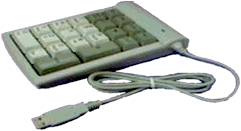 | 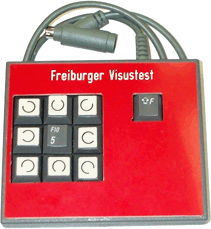 | 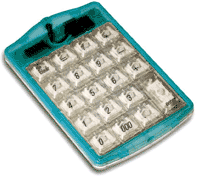 | 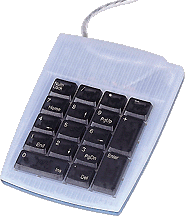 |
A slightly outdated “read me” file:
Freiburg Visual Acuity & Contrast Test --
Automated measurement of visual acuity & contrast sensitivity
©1993-1999 Michael Bach, Freiburg, Germany.
What it does
The “Freiburg Visual Acuity & Contrast Test” (FrACT) provides automated measurement of visual acuity and contrast sensitivity.
For both measures a Landolt C optotype is employed, where the gap of the C can have one of eight orientations. For visual acuity, the size of the optotype varies, contrast stays high. For contrast sensitivity, contrast varies, size stays large.
To estimate threshold, a Best-PEST algorithm is invoked.
Special computer graphics tricks allow threshold estimation on standard computer equipment: For acuity,
Hardware requirements
Suitable is any Apple Macintosh computer that can display gray scales. This includes: LC, LC II, LC III, Colour Classic, IIci, IIsi, Quadra 700/850/900, Centris 61/650, all Performa models and all Power Macintoshes, NuBus or PCI. Both black/white or colour monitors are adequate. The program should run with system 6.0.5, extensive testing has been done on system 7.0/7.1/7.5/7.5.1/7.5.2/7.5.3/ 8.1 / 8.5/ 8.5.1, 9.0. Free RAM of 1 MB is required.
To enjoy the benefits of anti-aliasing for acuity measurement, your monitor should have at least 16 shades of gray (bit depth > 4). To further enjoy the benefits of dithering for determination of contrast threshold, your monitor should have a bit depth of 8 or more.
Calibration
After a fresh install, the monitor size and observer distance must be entered in the dialogue "File/Preferences". Enter the width of the active display area in millimetres. Save this via "File/Save preferences". Luminance linearisation is more tricky: To improve on the linearity of video voltage vs display luminance (e.g. Metha et al. 1993), the 'gamma table' is changed interactively by equating a line pattern of space averaged 1/2 maximum luminance with a homogeneous area where video voltage is adjusted to the same brightness. The resulting correction is also saved via "File/Save preferences".
Starting the test
Apart from the obvious buttons and menu commands a test run can also be conveniently started from the numerical keypad (any digit key). Enter the position of the appearing Landolt C's gap via the numerical digit keys. These are spatially mapped to the 8 possible gap positions in an obvious way ("8"=top, "9"=top right, etc.). The digit key "5" aborts an ongoing test run (and inhibits display of the premature result).
4 or 8 gap positions?
As the question is open of whether to use only the 4 primary gap positions or whether to supplement it with the four oblique directions (altogether 8), the FrACT allows both. Briefly: 4 directions are less easily confused, but guessing probability is higher; 8 positions allow more rapid determination of visual acuity as guessing probability is lower. Final outcome should be identical.
Use the preferences to set the test to either 4 or 8 positions or to a setting, where the key that starts the test also determines the 4-Vs-8-mode: If the test is started by pressing one of the primary keys (2, 6, 8, 4), only the primary directions are used. If the test is started by pressing one of the oblique keys (1, 3, 9, 7), all 8 directions are utilised. This makes sense if you simultaneously connect two response boxes (see below): One with four keys for children and another with 8 keys for more rapid determination of visual acuity.
Miscellaneous topics
· Response box. For best response entry you may want to attach an external numeric keypad via a 5 m extension cable as "response box". Numerical keypads are available as Powerbook accessory for $100. It is better to make an extension for the response box than for the monitor for reasons of display quality. You can manufacture an ADB (Apple Desktop Bus, the thing where the mouse connects) extension yourself, using widely available Sony SVideo connectors (which are, amazingly, compatible with Apple's ADB connector). There is no problem in leaving keyboard and mouse attached while using an additional keypad (if you have enough ADB ports; unfortunately their number is dwindling on new models, but T-adapters are available).
· QuicKeys: You may want to employ "QuicKeys" to start the FrACT from the Finder with the "5" key. This allows complete
· Balloon help. Is now (from version 3.6) available again. Useful for the many preferences settings!
· Treating your subjects. I find the biggest problem with patients is keeping them happy in the threshold region: "Keep on pressing". The forced choice situation needs gentle prodding. If clear response errors are encountered, it seems best to abort the test run (by pressing "5") and start again. We usually do a binocular exercise run and then test the two eyes separately.
· Validity. Visual acuity will be surprisingly high for the following reasons:
- Normal subjects have much higher acuity than 20/20 anyway
- Forced choice tends to increase acuity by affecting (eliminating) the subject's criterion
- Our threshold definition is at 60% correct. This is lower than routine clinical standards and will seemingly increase acuity values. Still, psychophysically it is best to put threshold at the steepest point of the psychometric function.
- Any threshold estimation algorithm with ascending steps only (like most conventional acuity tests) will systematically underestimate the visual acuity as compared to 'bracketing' algorithms. An approximate correction can optionally be applied (via File/Preferences/Threshold)
· Crowding. I have implemented flanking stimuli to provoke crowding. What do you suggest for the optimal distance between frame and optotype?
· Number of trials. The standard value (18) may be too low for research projects
· Monitor. Standard monitors are fine at distances of several meters. For near acuity, we have installed a special black/white monitor which has an active screen area of only 5 cm width.
· Free trials. Every sixth trial is a free trial: The stimulus is presented 3 times higher than the current estimated threshold. This helps to keep your customers happy. Somehow I didn't like this in the contrast task, so free trials are only used in acuity measurement.
· Rationale for the contrast measure. In my humble opinion, clinically only two endpoints of the CSF are of interest; the high spatial frequency end corresponds to acuity, and the low spatial frequency limb is addressed by the large contrast optotype.
· Contrast testing should be done at low ambient lighting levels.
What the Menus do
Apple/About Tells you the version number etc.
Apple/Help Gives you the very text you are reading right now. Can be copied with C
File This menu gives access to tests, calibration and quit
File/Test acuity @4 directions initiates acuity test using 4 gap positions
File/Test acuity @8 directions initiates acuity test using 8 gap positions
File/Test contrast threshold initiates contrast sensitivity test using 8 gap positions
File/Demo mode To show off on exhibitions; termination with mouse button
File/Demo Landolt Cs demonstrates the effects of
File/Calibration grid helps to check on the spatial calibration
File/Linearize luminance calibration for the linearization of the display luminance vs. video voltage function
File/Measure contrast presents two centred fields that assist in contrast measurement. Mainly useful if you want to look at the interaction of contrast and acuity.
File/Preferences Lots of user definable settings. The tabulator key can be used to step between numeric entry boxes.
· Help (balloon help) is now working again, both in English and German
· Screen width (the part of the screen that can graphically be manipulated) in millimetres.
· Observer distance is measured in centimetres
· # of trials is kept separately for 4 and 8 positions to take the differing guess rate into account. The default setting of 18 (including free trials) may have to be increased in a research setting
· Time-out: If checked, a wrong response is automatically assumed if time has run out. Use with your own discretion.
· DIN Rounding: results are rounded to the nearest value (on a log scale) to the DIN steps of the tenth root of ten. Do not use outside of Germany :-) or when averaging several runs.
· Feedback. Toggles the feedback (the missing piece in the growing cake)
· Result to clipboard: If checked, every test result is put on the clipboard, so one can switch to a spreadsheet program running in the background and enter the result. The data are
· Contrast of Landolt C: For the standard visual acuity test, 100% is recommended, but can be changed here. A negative value inverts the contrast.
· Format: Switches between the decimal (1.0) and the fractional (20/20) form
· Language: Switches between English and German (for most texts)
· Directions: Explained below under "Fast preferences"
· Crowding: Explained below under "Fast preferences"
· Threshold: The German DIN procedure introduces a systematic bias towards lower acuities as compared to bracketing of the threshold by the best PEST. A correction factor can be applied for this if the individual slope is known. However, changing the slope by a factor of 2 changes the correction factor by 1%, so I put in the average slope. Setting this option to "max. slope", threshold is defined as the point of steepest slope on the psychometric function (probably preferred for research). Setting this option to "DIN corrected" reduces the displayed acuity by about 10% and makes the test more comparable to any
File/Save Preferences Saves your current preferences within the FrACT file (thus it must not be
Fast prefs Gives quick access to some of the "File/Preferences" settings
Fast prefs/Feedback Switches feedback on/off (the missing piece in the growing cake)
Fast prefs/4 Directions Test started with the "5" key will use 4 gap positions
Fast prefs/8 Directions Test started with the "5" key will use 8 gap positions
Fast prefs/4/8 1st key decides If a test is started by pressing either of "8, 6, 2, 4" keys, 4 gap positions will be used. If test is started by pressing either of "9, 3, 1, 7" (oblique) keys, 4 gap positions will be used.
Fast prefs/crowding off Switches the crowding frame off
Fast prefs/crowding on Switches the crowding frame on
Fast prefs/crowding alternates the crowding frame will toggle from run to run
Plea for feedback
Any suggestions, error & incompatibility reports, general criticisms (and praise) are welcome.
Thanks
Grateful thanks are due to:
- You, the reader, for perusing this file
- my wife for bearing with frequent programming spells at home
- my children for serving repeatedly as subjects
- Guntram Kommerell for general enthusiasm & support
- Andreas Jedynak for an interim implementation and many ideas
- Lew Harvey for a crash course “psychophysical signal analysis in a nutshell”
- Irene Gottlob & Alina Zubcov-Iwantscheff for suggesting a crowding test
- Karin Mittelviefhaus for motivation and research collaboration
- Thomas Meigen for running best PEST simulations
- Prof. Rassow for raising the idea that only 2 ends of the CSF need be measured
- Margret Schumacher for diligently putting all our glaucoma patients through the FrACT
- Denis Pelli for his “VideoToolbox”, from which I gleaned many programming ideas
- Hans Strasburger for testing and announcing the program on cvnet & www
- Bernhard Treutwein and Hans Strasburger for trying to tutor me about “maximum likelihood” analyses
- Michael Tan for performing the validation measurements with great dedication
- Bob Sekuler for inspiring support after the cvnet announcement
- Chip Scialfa for pointing to problems with the crowding frame
- Robert O’Shea for raising many problems with the contrast measurement (now solved) and inspiring words
- Stuart Anstis for ‘improving’ suggestions
- Michael F. Kamprath (kamprat@leonardo.net) for “CModalDialog” that made things easier
- Pauline Cheung & Helen Eng who found the bug in the Snellen ratio ouput
- Adele Diamond & Dima Amso who prodded me to find the bug in the Snellen ratio ouput
Literature
WWW site on vision software:
http://www.med.uni-muenchen.de/medpsy/vis/psyphs/psy_soft.html
or
http://vision.arc.nasa.gov/VisionScience/VisionScience.html
Bach M (1996) The “Freiburg Visual Acuity Test” – Automatic measurement of visual acuity. Optometry & Vision Sci 73:49-53
Bach M (1995) Der Freiburger Visustest – Automatisierte Sehschärfebestimmung. German J Ophthalmol 92:174-178
Bach M (1994) Computergesteuerte Sehschärfemessung – der “Freiburger Visustest”. Biomed J 41:19-23
Bach M (1992) Punkte statt Grauschleier. Dithering auf dem Macintosh und weitere QuickDraw-Geheimnisse. Computertechnik (c't) 7:184-188
Bach M, Strahl P, Waltenspiel S, Kommerell G (1990) Amblyopie: Lesegeschwindigkeit im Vergleich zur Sehschärfe für Gitter, Einzel-Landolt-Cs und Reihen-Landolt-Cs. Fortschr Ophthalmol 87:500-503
DIN 58220 (Juni 1990) Beuth-Verlag Berlin
Lieberman HR, Pentland AP (1982) Microcomputer-based estimation of psychophysical thresholds: The Best PEST. Behavior Research Methods & Instrumentation 14:21-25
Metha AB, Vingrys AJ, Badcock DR (1993) Calibration of a color monitor for visual psychophysics. Research Methods, Instruments, & Computers 25:371-383
Mittelviefhaus K, Bach M, Jedynak A, Kommerell G (1993) Der Freiburger Visustest. Ophthalmologe 90:132-135
Pelli D (1996) VideoToolbox. <http://rajsky.psych.nyu.edu/VideoToolbox/>
Pentland A (1980) Maximum likelihood estimation: The best PEST.
Perception & Psychophysics 28:377-379
Petersen J (1990) Zur Fehlerbreite der subjektiven Visusmessung.
Fortschr Ophthalmol 87:604-608
Treutwein B (1995) Adaptive Psychophysical Procedures. Vision Res 35:2503-2522

Last update 2018-06-12 by Michael Bach